GTA 6 activities examined in detail: sports, racing, water travel, fishing and everyday interactions, with the visible controls explained.
This analysis follows the official Extended Look and its recorded scene details. Each section explains the moment in writing; the timestamp afterwards opens the corresponding passage for comparison.
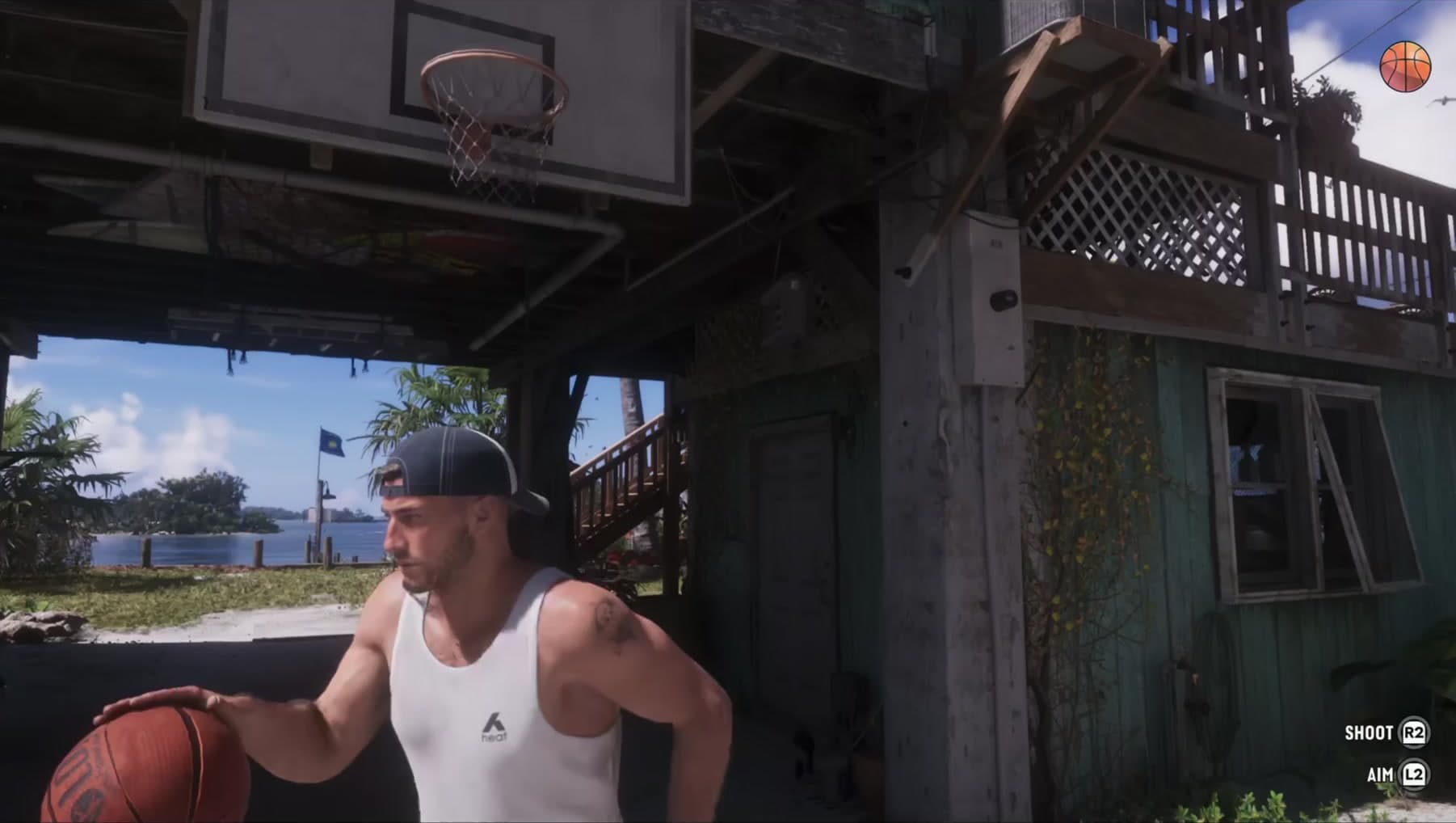
Basketball has SHOOT and AIM prompts
A basketball scene presents explicit shooting and aiming controls.
The interface provides SHOOT and AIM prompts while the character lines up at the hoop. That makes this more informative than a background basketball court: the controls are tied to an action in the scene. The short excerpt shows the activity’s immediate interaction, without displaying a tournament structure, team-selection screen or progression system. Readers can distinguish the demonstrated shot controls from the larger modes that remain unknown.
Watch 17:13–17:16
The gym shows a controlled bench-press action
A bench-press sequence has button prompts beneath GAINZ branding.
The bench-press action takes place beneath GAINZ branding, with button prompts visible during the exercise. The combination of movement and controls demonstrates participation in the gym scene rather than simply walking past equipment. What the excerpt does not show is the result over time: there is no before-and-after character statistic or physique comparison. The gym interaction is visible, while permanent strength or body changes remain unestablished.
Watch 17:19–17:23
The shooting challenge has target and time counters
The challenge has a targets-remaining counter and a countdown. Time-bonus notifications appear when targets fall.
The display combines targets remaining with a countdown, and knocking targets down produces time-bonus notifications. This gives the challenge an understandable immediate loop: hit targets while managing the time left. The bonus feedback is a more precise detail than simply calling it a timed range. The excerpt stops short of a results screen, so medal requirements, rewards and weapon unlocks cannot be specified from it.
Watch 18:31–18:35
Circuit racing shows laps and a 16-entry field
The racing HUD shows lap 1 of 2 and position out of 16. The player advances through the pack during the excerpt.
The circuit display shows lap 1 of 2 and a position measured against a 16-entry field. As the car moves through the pack, the position changes, giving the audience a way to follow progress independently of the camera. Laps distinguish the format from the percentage-based street race elsewhere in the reveal. Sixteen entries describe this depicted field; the counter does not reveal whether the competitors are human players or establish an online lobby limit.
Watch 17:42–17:47.5
The street race uses percentage progress
The street race shows progress as a percentage and position out of six.
The street event measures route completion as a percentage and places the racer in a field of six. That creates a different way to read progress from the lap counter in the circuit sequence: the display tracks completion of the route shown. The excerpt includes the surrounding streets and a large signed venue, but no route map with a measured length or prize screen. It shows this race’s presentation rather than the full event catalogue.
Watch 20:20–20:25
Dirt-bike racing has its own lap and position display
The off-road race uses lap and position counters, with a 12-entry field visible.
The off-road passage combines dirt bikes with its own lap and position counters. A field of 12 is visible in the display, distinguishing the depicted event from the 16-entry circuit and six-entry street race. The useful comparison is between the vehicles, surfaces and progress readouts. The numbers do not establish a universal race size or multiplayer capacity, and the short sequence does not show qualification or rewards.
Watch 18:35–18:39
An airboat travels through a green waterway
An airboat moves through a narrow channel surrounded by vegetation.
The airboat moves along a narrow channel with dense vegetation around the water. That setting gives the activity montage a different landscape from the open bay and city waterways shown nearby. The scene establishes movement through this environment with the craft in view. It does not include a rental screen, ownership menu or a labelled route, so access and location details remain outside what this shot explains.
Watch 17:10–17:13
Jet skis share the water with boats and buildings
Two personal watercraft move through the bay in the activity montage.
Two personal watercraft travel across the bay, sharing the setting with boats and waterfront buildings. Their movement gives the montage a faster, more open-water counterpart to the narrow airboat channel and the kayak passage. The shot is evidence of these craft being used in the depicted world. It does not identify a race structure, rental system or the total number of watercraft models available.
Watch 17:25–17:28
The montage includes a city-waterway kayak
A kayak passes moored boats with the city skyline ahead.
The kayak passes moored boats with the skyline ahead, placing a small human-powered craft within the city’s waterways. Its scale and pace contrast with the powered boats and personal watercraft elsewhere in the montage. This is a useful description of how the reveal presents variety on the water. The excerpt contains no activity briefing or reward display and does not establish every place the kayak can be taken.
Watch 17:29–17:32
An underwater passage has a dedicated bar
The player swims underwater through a dark passage with a slim on-screen gauge.
The swimmer moves through a dark underwater passage while a narrow gauge remains on screen. Keeping the setting and the bar together explains the basis for an air-related interpretation: the meter appears during submerged travel. The video does not label it or demonstrate depletion and recovery in full. Its exact function, the length of a dive and any equipment requirements therefore remain unresolved.
Watch 17:16–17:19
A pier jump includes a backwards somersault
A character runs along the pier and flips backwards into the water.
The movement begins with a run along the pier and ends with a backwards rotation into the water. Following the start and finish makes the action clearer than a still frame of the character in mid-air. It is a brief physical beat within the activity montage, connecting the pier to the water below. The passage does not show how the move is selected or whether it belongs to a challenge with scoring.
Watch 17:22–17:25
Fishing is visibly depicted on a named boat
A catch is held beside fishing rods on a boat marked LUREPREDATOR L35P; DINKA branding is visible on the outboard.
The closing shot brings a held catch, fishing rods and the boat into the same view. LUREPREDATOR L35P is readable on the craft, and DINKA appears on the outboard. Those details anchor the fishing scene in specific equipment rather than a generic coastal image. The excerpt does not follow casting, reeling and landing as a complete sequence or show a species register, so the wider fishing system remains unexplained.
Watch 25:50–25:53
Jason and Lucia can be prompted to hold hands
HOLD HANDS appears while the pair enter the rooftop venue; they are shown walking hand in hand.
As the pair approach the rooftop venue, HOLD HANDS appears as an available interaction. They are then shown walking together with their hands joined. The prompt gives this small relationship gesture a player-facing control, and the following movement shows what the action looks like. It supports a reading of everyday intimacy between the leads without revealing an affection score, branching romance choices or a relationship-progression menu.
Watch 09:50–10:01
Food has use and drop options
Jason holds a food packet with EAT and DROP actions visible near the street shops.
Jason holds a food packet near the street shops while EAT and DROP appear as separate actions. The interface describes what can be done with the object already in his hand, which is more specific than merely showing food in the environment. The scene does not accompany those choices with an explained hunger meter or stat change. It demonstrates an object interaction without defining a survival system.
Watch 09:03–09:08
Smoking has an on-screen action prompt
A SMOKE prompt is visible during the balcony conversation with Brian.
A SMOKE prompt appears during the balcony conversation with Brian. The action sits within a social scene rather than a separate activity menu, keeping the conversation and the held object together. This shows how an ordinary gesture can be offered while dialogue continues. The passage does not explain an inventory cost, status effect or progression benefit associated with smoking.
Watch 11:22–12:20
The nightlife montage shows drink and drop actions
Lucia holds a drink with DRINK and DROP controls visible.
Lucia holds a drink while DRINK and DROP are offered on screen. The two choices mirror the use-or-discard presentation seen with food elsewhere in the reveal. That consistency helps readers understand the immediate interaction language: the prompts relate to the object currently held. The short nightlife passage does not show a full intoxication system or explain lasting effects on movement and abilities.
Watch 20:28–20:32
A rooftop jump becomes a parachute descent
The sequence shows the roof departure, freefall over the waterways and an opened canopy.
The sequence follows the departure from the roof into freefall, with waterways below, before the canopy opens. Showing those stages together establishes more than a scenic aerial shot: the descent has a visible start and a change in movement as the parachute deploys. The reveal does not display how parachutes are acquired or unlocked, or whether every rooftop offers the same opportunity.
Watch 18:47–19:00
What this tells us
The clearest activity examples pair visible actions with controls or counters: basketball, the gym, the shooting challenge and racing. Fishing and the water-travel scenes show other parts of the world without demonstrating complete reward or progression systems. The distinction helps separate what the reveal actually lets us follow from the questions that require a longer demonstration.
Read next
GTA 6 character switching: the two portrait-selector sequences · GTA 6 Extended Look: the gameplay, story and details shown
SixCentral is an independent fan resource and is not affiliated with Rockstar Games or Take-Two Interactive. Sources and interpretation are identified in our coverage. Official game imagery is credited to its owner; SixCentral branding is original. This page may contain affiliate links.